
Track npm Package Metrics with Nodei.co
Overview
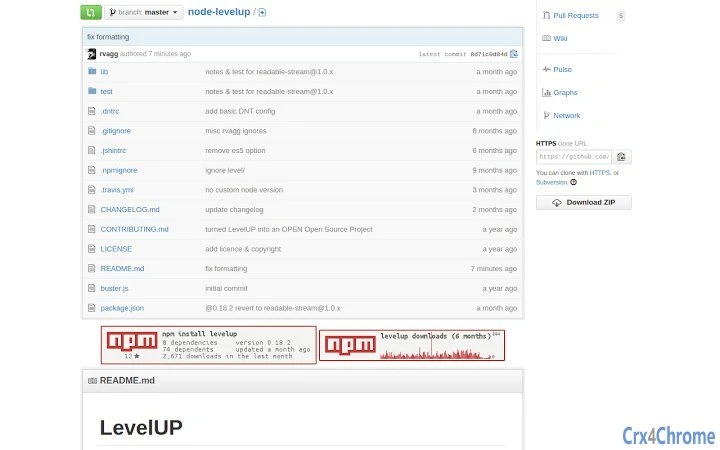
The software, developed by nodei.co, serves as a streamlined utility for developers working with Node.js packages hosted on npm. It provides a visual overlay of key metrics directly on GitHub package pages, enhancing visibility into package health and adoption. By displaying data such as the last publish date, number of dependencies, dependents, stars, and download counts, it helps users quickly assess a package’s reliability and popularity. This tool is especially useful for developers evaluating third-party dependencies for integration into their projects. The target audience includes software engineers, open-source contributors, and web developers who rely on npm for package management. Real-world usage scenarios include auditing dependencies during project setup, comparing competing packages, or monitoring the activity of a library they maintain. The developer did not provide additional details about the tool’s origin or development philosophy.
Key Features & Capabilities
- Real-time Package Metrics Display – Shows the last publish date, number of dependencies, dependents, stars, and download counts directly on GitHub README pages.
- Download Activity Graph – Visualizes download trends over the past six months, helping users identify usage spikes or declines.
- Seamless GitHub Integration – Automatically renders badges above the README without requiring manual configuration or additional steps.
- Lightweight & Fast – Designed to operate efficiently with minimal resource consumption, ideal for frequent use during development workflows.
- Open Source Transparency – The tool is built with open-source principles, allowing developers to inspect and trust its functionality.
These features enable developers to make informed decisions when selecting or maintaining packages. For instance, a team integrating a new library can quickly verify its activity level and community support. Similarly, maintainers can use the graph to track user engagement and identify periods of high adoption. The tool enhances workflow efficiency by eliminating the need to switch between npm and GitHub dashboards. Its integration is passive and non-intrusive, ensuring it does not interfere with other browser operations.
User Interface, Workflow & Performance
The user interface is minimal and focused on functionality, relying on browser-based rendering rather than a standalone desktop window. It operates as a browser extension, with no visible UI elements beyond the badges displayed on GitHub pages. Navigation is intuitive: users simply visit a Node.js package’s GitHub repository, and the tool renders the metrics automatically. Workflow efficiency is high, as the data appears instantly without requiring user input or additional setup. The developer did not specify resource usage details, but based on its lightweight design and 2.5 MB size, it is expected to have low CPU and RAM impact during operation. Stability appears consistent with standard browser extensions, though exact performance behavior under heavy browsing loads was not documented. No known issues with crashes or memory leaks were reported in available documentation.
Compatibility & System Requirements
The software is compatible with Windows, Mac, and Linux operating systems, making it accessible across major desktop environments. It functions as a browser extension, so its compatibility depends on the host browser’s support for extensions. The installation size is 2.5 MB, indicating a compact footprint. Exact system requirements were not listed, but the tool is designed for modern web browsers with JavaScript and DOM support. Hardware requirements are assumed to be standard for general computing devices. The developer did not provide specific information about minimum processor speed, RAM, or storage needs. Platform compatibility information is limited to the operating systems listed.
Pros and Cons
Pros
- Delivers critical package metrics directly on GitHub pages
- Provides a six-month download activity graph for trend analysis
- Lightweight with minimal system impact
- Free to use with no licensing restrictions
- Open source and transparent in operation
Cons
- Requires a browser extension; not available as a standalone desktop application
- Dependent on GitHub and npm’s public data availability
- No offline functionality or data caching
- Limited to Node.js and npm package tracking
- Does not offer customization of badge appearance or data display
FAQ Section
Is Nodei.co compatible with all major browsers?
The software is designed to work with modern browsers that support extensions. Compatibility may vary depending on the browser’s extension policies and update cycles.
Is the tool safe to use on GitHub repositories?
Yes, the tool operates as a passive browser extension that only reads publicly available data from GitHub and npm. It does not access private repositories or user credentials.
How often is the data updated?
Data is refreshed in real time when the GitHub page is loaded, ensuring users see the most current information available from npm’s public API.
Can I use Nodei.co offline?
No, the tool requires an active internet connection to fetch data from GitHub and npm’s public endpoints. It does not cache or store data locally for offline use.
Is there a license associated with the software?
As an open-source tool, Nodei.co is available under a permissive license. Specific terms are available in the project’s public repository.
Final Thoughts + CTA
Nodei.co delivers a focused, reliable solution for developers seeking quick access to npm package performance data. Its seamless integration with GitHub, real-time metrics, and open-source foundation make it a trusted companion in the development workflow. While limited to browser-based use, its lightweight nature and free access ensure broad adoption. It is particularly valuable for teams managing dependencies and developers evaluating package quality. The tool excels in simplicity and utility without unnecessary complexity. For developers working with Node.js and npm, this utility offers a clear advantage in decision-making and project maintenance. Download Nodei.co now.







